
Included in Growth and Pro (weekly grids on Pro)
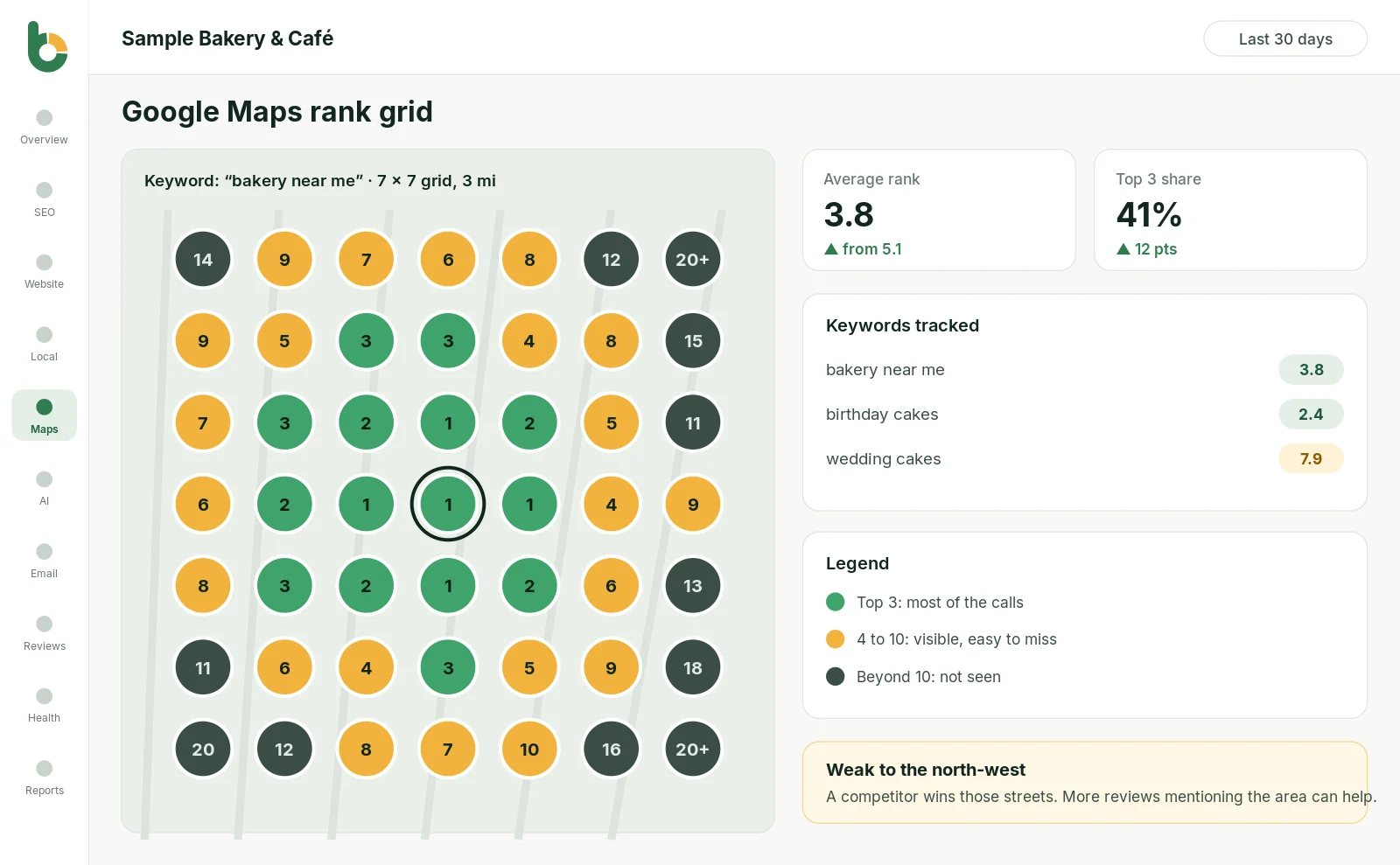
Your Google Maps position changes depending on where the customer is standing. Bloomize checks your rank from 49 points around your business and shows the result on a simple color map, so you know exactly where you win and where a competitor does.
What we measure
Your Maps position checked from 49 points in a grid around your business, shown on a color-coded map.
Your average position across all 49 points, tracked over time so you can see real progress.
The percentage of the area where you appear in the top 3, the “map pack” that gets most of the calls.
The searches that matter most to you, such as “dentist near me” or “wedding cakes”, each with its own grid.
Which businesses beat you in each part of the map, so you know who you are really up against (Pro).
Every grid is saved. Compare this month with last month and see whether your changes are working.
Ask “what is my Google Maps ranking?” and most tools give you one number. But Google Maps results depend on the searcher’s location. You might be #1 for someone across the street and #15 for someone two miles away. A rank grid shows the whole picture: the streets where you get calls and the streets where you are invisible.
Read more in our guide: how Google Maps rankings work, and why a rank grid helps.
Example from a real-style report
Bloomize also writes a one-line summary, such as “weak to the north-west”, and suggests what usually helps: more reviews that mention the area, a better Business Profile category, or local pages on your website.
The rank grid is most useful for businesses that depend on nearby customers: restaurants, dentists, clinics, salons, contractors, home services, law firms and retail stores. Agencies use it to show clients exactly where their local SEO work is paying off.
Growth includes a monthly grid for your main keywords; Pro adds weekly grids and competitor tracking. Contact us if you need more.
Yes. The grid is centered on your business address and checks Google Maps results as a customer at each point would see them.
Changes such as new reviews or profile updates usually show up within a few weeks. The monthly history shows whether you are moving in the right direction.
Try Bloomize free
14-day free trial, cancel anytime. Read-only access to your accounts, and you can disconnect at any time.